MaxMobile for Lync1.0.0.1507
Publisher Description
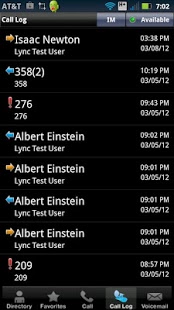
MaxMobile is an Android client for Microsoft Lync, making it easy to use Lync features and keeping you connected to the corporate environment; making communication more collaborative, engaging, and accessible.
IMPORTANT: This application requires connectivity to MaxMobile Server 2011 running in your corporate network, and will not work without it. Please read the requirements section below.
Requirements:
**AltiGen’s MaxMobile Server 2011 deployed in the corporate network
**Microsoft Lync Server 2010 deployed in the corporate network
**Microsoft Exchange 2010 required for Visual Voicemail
The MaxMobile application provides mobile access to the following Lync features:
--Enterprise Voice (extension & external dialing [via GSM, VoIP/3G and VoIP/WiFi], mid-call call control, conference, transfer, and hold)
--Instant Messaging/Presence
--Lync Directory; complete with Social Text, and One-Touch Call, IM and Email
--Synchronized Call Log
--Visual Voicemail with Exchange 2010
In an increasingly mobile business environment, MaxMobile improves employee productivity, reduces communications costs and eliminates the need for separate desktop phones; enabling organizations to deploy a complete Unified Mobile Convergence solution with Microsoft Lync.
About MaxMobile for Lync
The company that develops MaxMobile for Lync is AltiGen Communications, Inc.. The latest version released by its developer is 1.0.0.1507. This app was rated by 1 users of our site and has an average rating of 3.0.
To install MaxMobile for Lync on your Android device, just click the green Continue To App button above to start the installation process. The app is listed on our website since 2012-03-20 and was downloaded 34 times. We have already checked if the download link is safe, however for your own protection we recommend that you scan the downloaded app with your antivirus. Your antivirus may detect the MaxMobile for Lync as malware as malware if the download link to com.altigen.mobile.lync is broken.
How to install MaxMobile for Lync on your Android device:
- Click on the Continue To App button on our website. This will redirect you to Google Play.
- Once the MaxMobile for Lync is shown in the Google Play listing of your Android device, you can start its download and installation. Tap on the Install button located below the search bar and to the right of the app icon.
- A pop-up window with the permissions required by MaxMobile for Lync will be shown. Click on Accept to continue the process.
- MaxMobile for Lync will be downloaded onto your device, displaying a progress. Once the download completes, the installation will start and you'll get a notification after the installation is finished.
Program Details
System requirements
Download information
Pricing
Version History
version 1.0.0.1507
posted on 2012-03-20
version 1.0.0.1507
posted on 2012-03-20
Several fixes and updates
